QR Code Generator
Turn a link, a note, an email address, a phone number or your Wi-Fi login into a real QR code. Choose the error-correction level, size and colours, then download a sharp PNG or an infinitely scalable SVG. The code is built by an encoder running inside this page — nothing is uploaded, and your codes never expire.
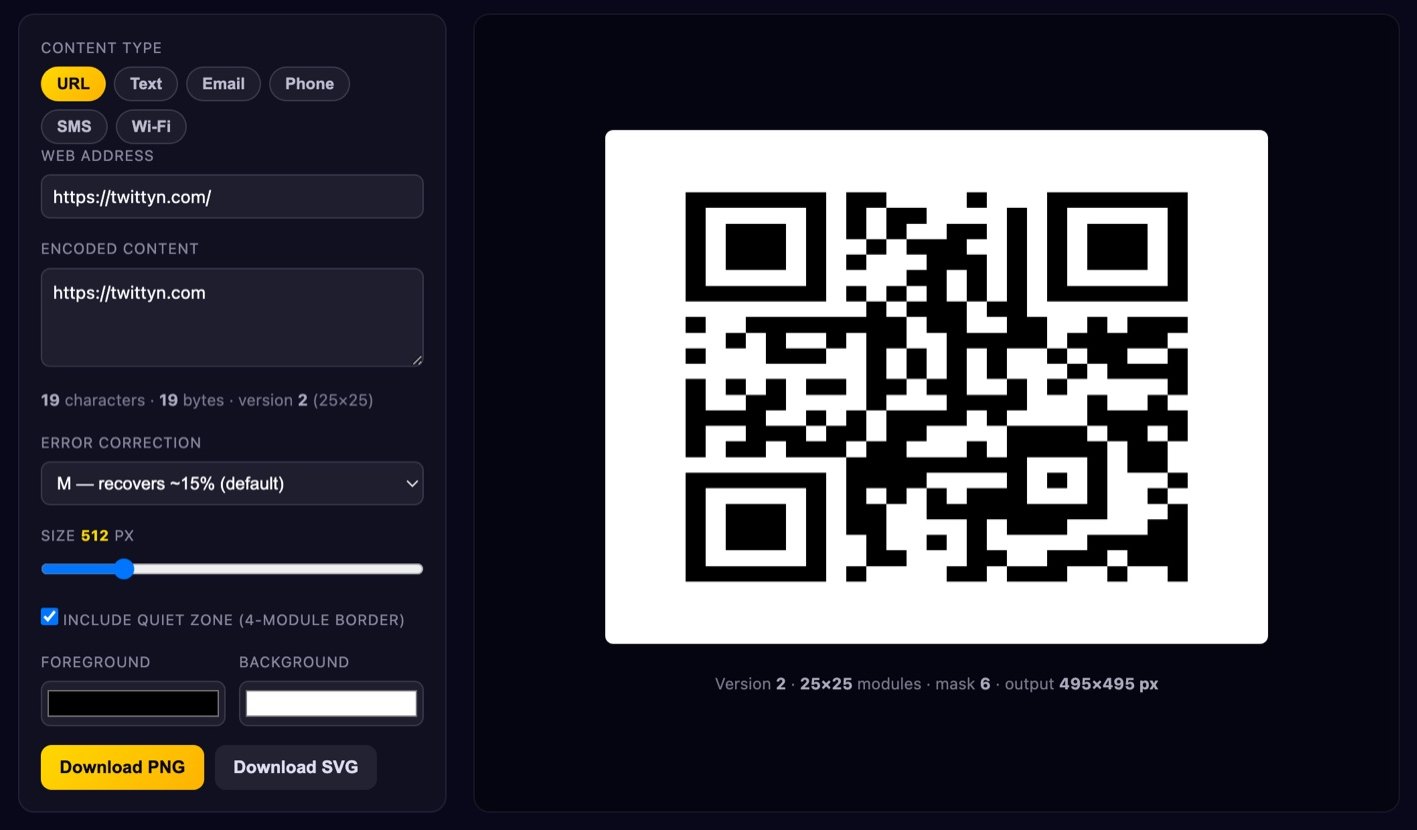
How to make a QR code
- Pick a content type. URL and Text encode what you type. Email, Phone, SMS and Wi-Fi build the correct payload for you — a Wi-Fi code has to look like
WIFI:T:WPA;S:MyNetwork;P:secret;;or phones read it as plain gibberish. - Check the content box. Whatever ends up there is exactly what a scanner sees. You can edit it by hand.
- Choose an error-correction level. M is a good default; go higher if the code will be small, curved or logo-covered.
- Set size and colours. Keep the quiet zone on, and fix the contrast warning if it appears.
- Download and test. PNG for screens, SVG for print. Try it on at least two phones before it goes to a printer.
How a QR code actually works
A QR code is a grid of squares called modules. Version 1 is 21×21; each version up adds four per side, so version 40 is 177×177. The version your code needs is shown live under the content box.
The three big corner squares are finder patterns. A scanner looks for their unmistakable 1:1:3:1:1 ratio of dark and light runs along any line through them, which lets it locate the code anywhere in the frame and work out its rotation and perspective — that is why you can scan sideways or at an angle. Smaller alignment patterns appear from version 2 onwards and correct for curve and tilt. The dotted lines between the finders are the timing patterns: they tell the decoder exactly how wide one module is.
Your text becomes bytes (UTF-8 here), prefixed with a mode indicator and a length, then padded to fill the version exactly. Those bytes are laid into the grid in a zig-zag of two-module-wide columns, skipping every square reserved for a function pattern. Finally the whole thing is XORed with one of eight mask patterns; the encoder builds all eight, scores them with four standard penalty rules that punish large same-colour blobs and finder-lookalikes, and keeps the best.
The redundancy comes from Reed–Solomon codewords computed over the finite field GF(256) and interleaved with the data in blocks. Interleaving matters: a coffee stain that wipes out one region damages a few bytes of every block instead of destroying one block outright, and Reed–Solomon can rebuild those.
Error correction: L, M, Q or H
Every QR code carries spare data. The level decides how much of it can be destroyed and still read:
- L — about 7% recoverable. Smallest grid for a payload; fine on screen.
- M — about 15%. The usual default, and right most of the time.
- Q — about 25%. For print that gets handled, folded or scuffed.
- H — about 30%. For codes printed small, on curved surfaces like bottles and mugs, or with a logo in the middle.
The trade-off is density: more correction means more codewords, a bigger version at the same physical size, smaller modules and a harder read for a cheap camera. Going from L to H can push you up several versions, so H is not automatically "safer" at a fixed print size.
Making sure your code actually scans
Keep the quiet zone. The spec asks for four empty modules of margin on all sides. Without it a decoder cannot tell where the code ends and your poster begins — the most common reason a valid code fails in the wild, and why the toggle is on by default.
Keep it dark-on-light. Scanners assume dark modules on a light background. Inverting works on some phone cameras and fails on plenty of others, including most dedicated scanners. For dark branding, put a light panel behind the code instead. The tool warns you when your colours are too close in luminance, or inverted.
Do not print it too small. Roughly a tenth of the scanning distance: about 2 cm for something held in the hand, 2.5–3 cm on a flyer, much larger for a window. Give each module at least two printer dots.
Test on more than one phone. Camera apps differ enormously in how forgiving they are; an old Android in dim light is the real test. Test the destination too — a code that scans perfectly onto a broken URL is still a failure.
Static vs dynamic QR codes
The codes here are static: the destination is baked into the pattern. They are free forever, work offline, never expire, count no scans, and cannot be switched off behind your back. The honest limitation is that you cannot change where a printed static code points — if the URL changes, you make a new code.
Dynamic codes encode a short link on someone else's domain that redirects to your real destination, so the target stays editable and you get scan statistics. In exchange, that provider sits between your customers and your site, logs every scan, and charges to keep the redirect alive; if they shut down or you stop paying, every printed code goes dead. A good middle ground is a short URL on a domain you control.
Is my data uploaded?
No. The encoder — bit stream, Reed–Solomon maths, masking and rendering — is JavaScript running in this page. Your text, passwords and Wi-Fi keys never leave your device, and no request is made to build a code. See our Privacy Policy for details.
What's the maximum amount of text?
In byte mode, 2,953 bytes at level L and 1,273 at H (version 40). Stay far below that: a 1,000-character code needs a 177×177 grid and only scans from close range. Encode a short URL, not a wall of text.
Can I put a logo in the middle?
Yes. Generate at level H, download the SVG or a large PNG, and place the logo over the centre in any image editor. Keep it under about a quarter of the code's area, leave a light border around it, and re-test.
Why did the version number jump?
The version is the smallest grid that fits your data at the chosen error-correction level. Adding characters or moving from M to H both consume capacity, so the encoder eventually steps up a version — four more modules per side.
Do QR codes expire?
A static code never does; the data is in the pattern, not on a server. What breaks is the destination behind it — a dead URL, a changed Wi-Fi password. Paid "dynamic" codes can expire, because they depend on an active subscription.
PNG or SVG, and can I use these commercially?
PNG for screens and email; SVG for print or anything that gets resized, since it is pure vector geometry. And yes — QR Code is a Denso Wave trademark, but the spec is open and the codes are free to use commercially, no attribution needed.
More free tools that run entirely in your browser: the favicon generator, the password generator, or browse all twittyn tools.