Favicon Generator
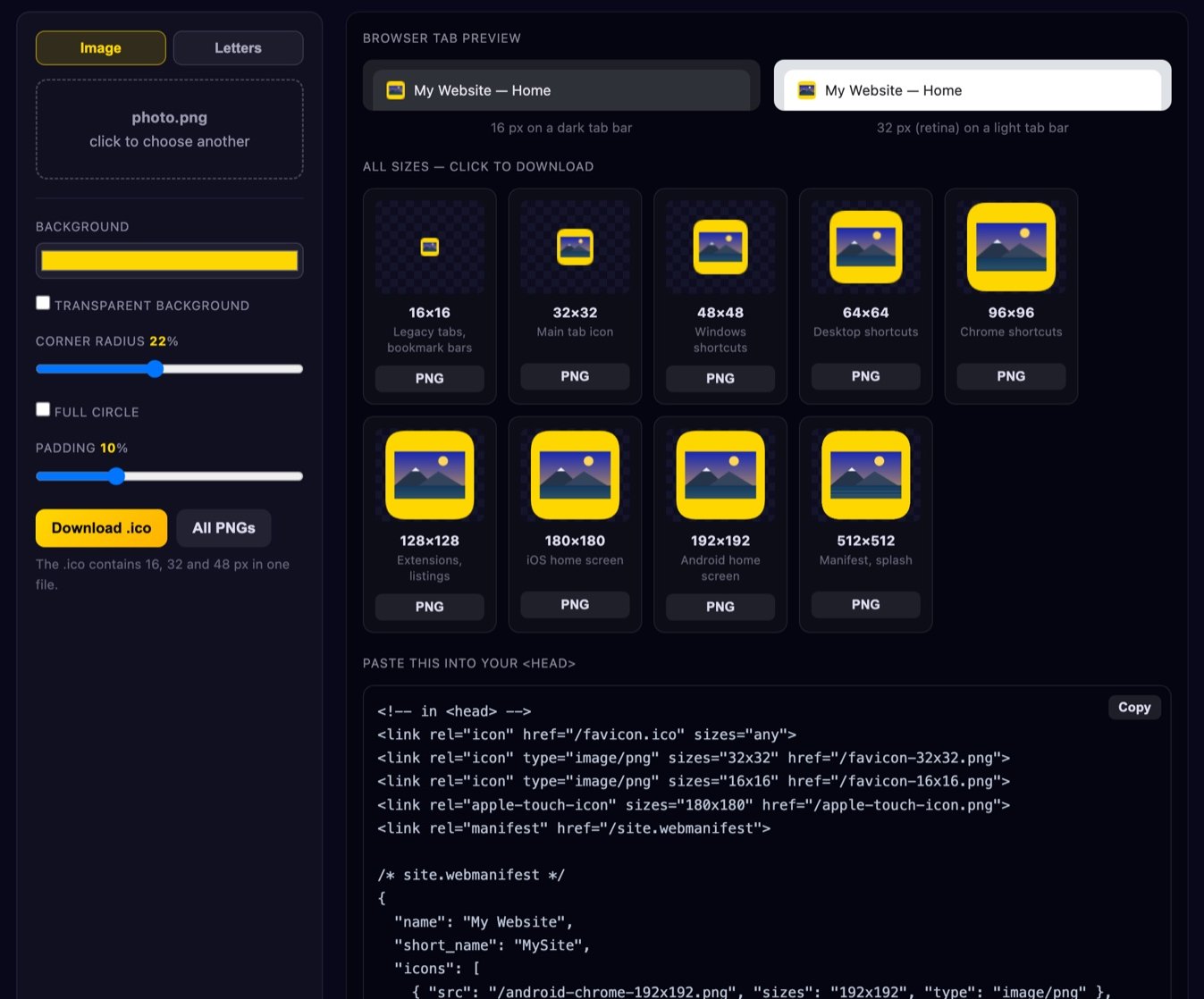
Turn any image — or just one or two letters — into a complete favicon set. You get every PNG size browsers ask for, a real multi-size .ico file and the HTML tags to paste into your <head>. Everything is rendered on your own device; nothing is uploaded.
or click to choose a file
The .ico contains 16, 32 and 48 px in one file.
How to make a favicon
- Add your artwork. Drag a logo, mark or photo onto the box, or click to pick a file. A square PNG or SVG-exported PNG at 512 px or larger gives the cleanest result, but any image works — it is fitted inside the icon without distortion.
- No logo? Use letters. Switch to the Letters tab and type one or two characters. Pick a background and text colour with enough contrast and you have a perfectly respectable monogram favicon in about ten seconds.
- Shape it. Set a background colour or make it transparent, choose a corner radius (or a full circle) and add a little padding so the artwork is not jammed against the edges. Around 10 % padding is a good default.
- Check the tab preview. The two mock tabs show the icon at the size people actually see it, on both a dark and a light tab bar. If you cannot tell what it is there, simplify it before going further.
- Download. Grab the individual PNGs you need, and the
.icoif you still support old browsers. Then copy the HTML snippet at the bottom into your page.
Which favicon sizes do you actually need?
Favicon guides love to list twenty files. In practice a modern site needs four or five, and each of them has one concrete job:
- 32×32 — the workhorse. This is what Chrome, Firefox, Safari and Edge reach for in the tab strip and in most bookmark and history lists on standard-density displays. If you only ship one PNG, ship this one.
- 16×16 — legacy and dense lists. Still used in bookmark bars, some history views and older browsers. It matters less than it used to, but it is cheap to include and it is the size where a bad icon looks worst, so it is a useful test case.
- 48×48 and 64×64 — desktop shortcuts. Windows and some desktop environments use these when a page is pinned or saved to the desktop. 48 is the one that goes inside the
.ico. - 96×96 and 128×128 — in-between duty. Handy for Chrome's older shortcut sizes and for extension or dashboard listings that want something bigger than a tab icon but smaller than an app icon.
- 180×180 — iOS home screen. Referenced with
rel="apple-touch-icon". iOS applies its own rounded mask, so give this one a solid background — transparency turns black on the home screen. - 192×192 and 512×512 — Android and installable web apps. These are the two sizes a web app manifest normally declares. Android uses 192 for the home screen and 512 for the splash screen and app listings.
- .ico — compatibility only. A single
favicon.icoat the site root covers old Internet Explorer, legacy Edge and any crawler or feed reader that blindly requests that path. Modern browsers prefer your PNG tags, so treat the .ico as a safety net rather than the main event.
Designing an icon that works at 16 pixels
A favicon is not a small logo. It is a separate piece of design that happens to share your logo's identity. At 16 px you have 256 pixels in total — roughly the information budget of a single emoji — so every decision has to earn its place.
- One bold shape. Pick the single most recognisable element of your brand: the mark, not the wordmark; the animal, not the whole crest. If your logo is a shape plus text, drop the text.
- No fine detail. Thin strokes, gradients, drop shadows and inner cut-outs disappear or turn to mush after downscaling. Strokes should be at least 1/16 of the icon width so they survive as a solid pixel line.
- One or two letters at most. Three letters at 16 px is an illegible smear. Two is workable with a heavy weight; one is always safe.
- High contrast, and a real background. A coloured square behind a light mark reads far better than a transparent icon that has to compete with whatever the browser chrome is doing. It also gives you a shape that stays visible on both themes.
- Test on light and dark. A dark navy mark on transparency vanishes in a dark tab bar; a pale yellow one vanishes in a light one. The two previews above exist precisely so you notice this before your visitors do.
- Crop in, then add padding. Counter-intuitively, cropping tighter on the mark and adding uniform padding usually reads better than shrinking the full logo, because the subject ends up occupying more of the pixels.
How to add it to your site
The tags go inside <head>, anywhere before the closing tag — conventionally near the top with your other metadata. Upload the PNGs to a folder such as /icons/, put favicon.ico in the site root, and reference them with absolute paths starting with / so they resolve identically on every page and subdirectory.
The root /favicon.ico path is a convention, not a requirement. Browsers and many crawlers will request it automatically even if you never link to it, so having a file there stops a stream of 404s in your logs. Everything else needs an explicit <link> tag. If you ship a web app manifest, list the 192 and 512 px icons there rather than in the HTML.
Then there is caching. Browsers cache favicons unusually aggressively — often far beyond the lifetime of your normal cache headers, and sometimes in a separate icon database that a plain reload does not touch. If your new icon does not show up, hard-refresh (Ctrl/Cmd + Shift + R), open the icon URL directly in a tab to confirm the new file is really being served, or simply change the filename (favicon-v2.png) and update the tag. Renaming is the only method that works reliably every time, and it is what we do ourselves.
Is my image uploaded?
No. Every size is drawn on your own device with the HTML5 Canvas API, and the .ico is assembled byte by byte in JavaScript in your browser. Your image is never sent to a server, never stored and never seen by us — there is no upload step at all, which also means the tool keeps working offline once the page has loaded. More detail in our Privacy Policy.
FAQ
Why is my favicon not updating?
Almost always browser caching. Favicons are cached far more aggressively than page assets, sometimes in a dedicated icon store that ignores a normal refresh. Try a hard refresh, then open the icon file's URL directly to check which version the server is actually returning. If it is still stale, rename the file and update the <link> tag — a new URL sidesteps the cache entirely. Also check for a proxy or CDN in front of your site holding an old copy.
Do I still need a .ico file in 2026?
Only for compatibility. Every current browser prefers PNG icons declared with <link rel="icon">. The reason to keep a root favicon.ico is that old Internet Explorer builds, legacy Edge, some feed readers and various crawlers request that exact path regardless of your tags. It costs a few kilobytes and eliminates a class of 404s.
Can I use a PNG with transparency?
Yes, and for tab icons it often looks good. The exception is apple-touch-icon: iOS composites home-screen icons onto black, so a transparent 180×180 turns into a dark blob. Give that size — and ideally the 192 and 512 manifest icons too — a solid background colour.
What about SVG favicons?
Modern browsers support <link rel="icon" type="image/svg+xml" href="/icon.svg">, and an SVG can even adapt to dark mode via a media query inside the file. It is a nice progressive enhancement, but you still want PNGs and an .ico as fallbacks, since older browsers and most non-browser clients ignore SVG icons.
Does my source image have to be square?
No. Non-square images are fitted inside the icon area without stretching, so nothing gets distorted — you just get empty space on two sides. If that bothers you, crop to a square first with our image resizer, or add a background colour here to fill the gap.
Next: resize the rest of your site's images with the image resizer, pick matching brand colours with the colour palette generator, or browse everything in twittyn tools.