Brick Reveal
Turn any photo into an oddly satisfying brick-breaker video — a wall of bricks hides your picture, and a smart bot chips it away piece by piece until the image is revealed.
▶ Play Brick Reveal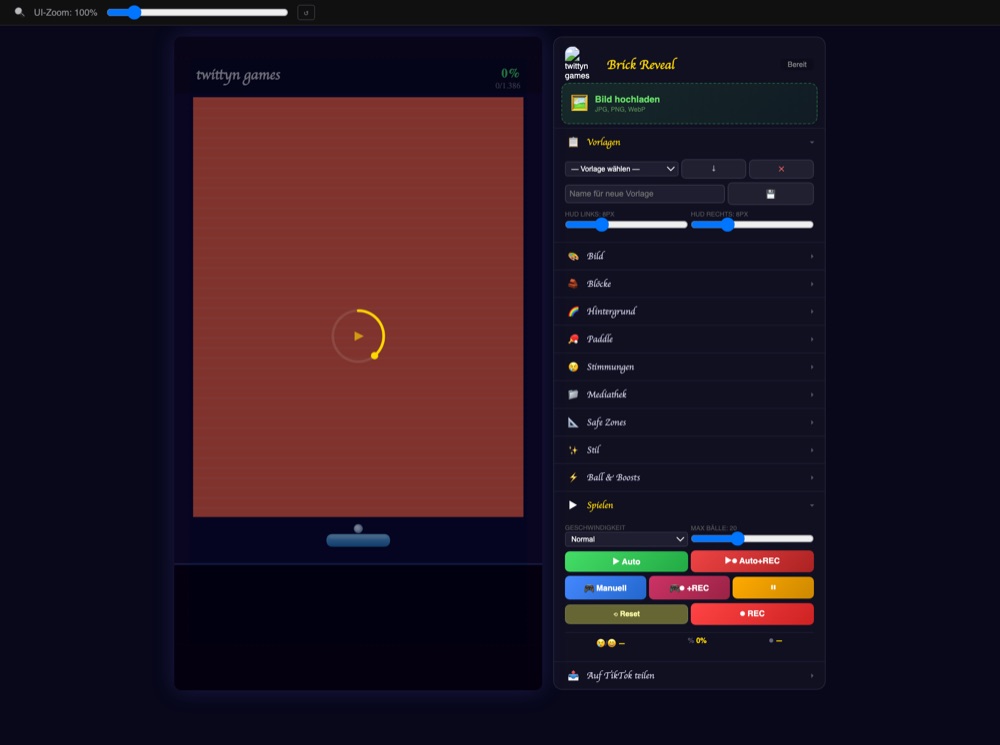
Under the hood: how the bot actually clears the wall
Every Auto-Play run is driven by a real trajectory simulation, not a scripted path. Each frame, the bot fast-forwards the live ball's position 500 steps into the future, bouncing that simulated point off the same safe-zone edges the real ball uses, until it lands at paddle height. The paddle chases that predicted landing spot, not the ball's current position — which is why the movement reads as a player reacting early rather than a hitbox snapping to the ball at the last second.
When only one ball is left, the aim gets sharper: the bot works out how much time remains before landing and computes the exact paddle speed needed to close the gap, clamped between 200 and 1500px/s in the game's 405×720 play-field coordinates. It also watches its own last three paddle hits — if they're clustered within half a paddle-width of each other, it nudges the next aim toward whichever side of the board still has more bricks standing, so a run never gets stuck rallying the same corner for thirty seconds straight.
The one rule that's never allowed to break
Before each physics step, the game counts how many balls are currently alive. If that number is exactly one, the fall-off-bottom check is disabled for that ball — it is not allowed to pass the paddle, full stop. Extra balls from the ×3 boost can absolutely be lost, that's part of the fun, but the last ball is protected every single frame. The paddle is also never teleported to the ball's x-position; it always moves at a bounded speed, and a lost ball is never respawned mid-air. Collision itself runs five sub-steps per frame, checking the ball's penetration depth against every brick from all four sides and bouncing off whichever side it penetrated least, so a fast ball can't tunnel through a corner. And if a ball still manages to get stuck orbiting a gap — we track its last 30 positions rounded to a 10px grid — the game detects the loop and kicks it off in a random direction at 70% speed rather than leaving it to grind in place.
Built at 1080×1920, recorded at 1080×1920
The canvas is 1080×1920 internally; what you see on screen is a 405×720 preview scaled up 2.667× with a single canvas transform. When you hit record, captureStream(30) runs directly on that full-resolution canvas — there's no separate offscreen render or upscale pass, so the WebM you download is native HD, not stretched afterward. Safe zones come from a per-platform preset (YouTube Shorts, TikTok, Instagram Reels, or a “safest of all” default) and physically move the play boundaries: the ball bounces off the safe-zone edge, not the raw canvas edge, and the paddle's resting line sits above the bottom safe zone automatically. The HUD deliberately shows only two numbers — percentage revealed and bricks remaining — no score, no hearts, just the reveal.
Your image feeds two different canvases
On upload, the image is rendered twice: once untouched, held clean for the final reveal, and once through a separate blurred canvas that the brick grid samples its colors from in “Bildfarben” mode. That's why the bricks can look like a soft, color-averaged mosaic of your photo while the picture underneath stays sharp the moment it's uncovered. The blur slider (0–40px) works the same way in reverse: it starts at full strength on the visible image and decreases in direct proportion to bricks destroyed, hitting 0px exactly when the wall is empty.
The wall layout itself can be generated from your image. The “Auto” template runs a Sobel edge filter over the uploaded photo, converts it to grayscale, measures the gradient magnitude under every brick cell, and turns any cell above a fixed threshold into a wall — then strips out isolated single-cell walls that have no neighbors. In practice it traces the real contours of your photo (a jawline, a logo edge, a horizon) into permanent walls before a single brick has been destroyed.
Fireballs, floors, and a mood system that fades instead of flips
Four boosts can drop mid-run: a temporary ×3 ball split, a wider paddle, a safe floor that catches balls for a few seconds, and a fireball that lets the ball punch straight through bricks without bouncing — walls still block it, on purpose, so a hand-drawn layout is never fully bypassed. Each boost has its own color and its own on/off switch, and none of them spawn once a run is at its configured ball cap. Hitting 25%, 50%, 75% and 90% revealed triggers a screen shake, a colored flash and a particle burst — small celebrations baked straight into the recording, no editing needed afterward. The mood system doesn't hard-cut between happy and sad either: landing a hit resets a 0.7-second “still happy” timer, and both the visuals and the audio gain nodes fade over roughly a third of a second, so a mood swing reads as a beat instead of a glitch.
Quick start
- Upload an image (or skip it for the demo picture), then pick a wall template — maze, frame, spiral, scatter or the image-traced Auto — or draw your own with the block editor.
- Press Auto+REC. Recording starts immediately and stops itself two seconds after the last brick falls.
- Download the WebM, or connect a TikTok account to set a title, hashtags and privacy level and post straight from the page.
Does the fireball skip the whole wall?
No. Fireball only ignores regular bricks. Anything marked as a wall — from a template or drawn by hand — still bounces it, so the layout you built keeps its shape even mid-fireball.
Why does my recorded clip look exactly like the preview?
Because it's the same canvas. There's no separate export render, so what the bot plays is exactly what gets captured — same resolution, same timing, same 30fps, nothing re-encoded or upscaled after the fact.