Team Picker
Paste a list of names, one per line, and split it into random teams in one click. Choose how many teams you want or how big each team should be, rename any team, and copy the whole result as text. It runs entirely in your browser — no signup, no upload.
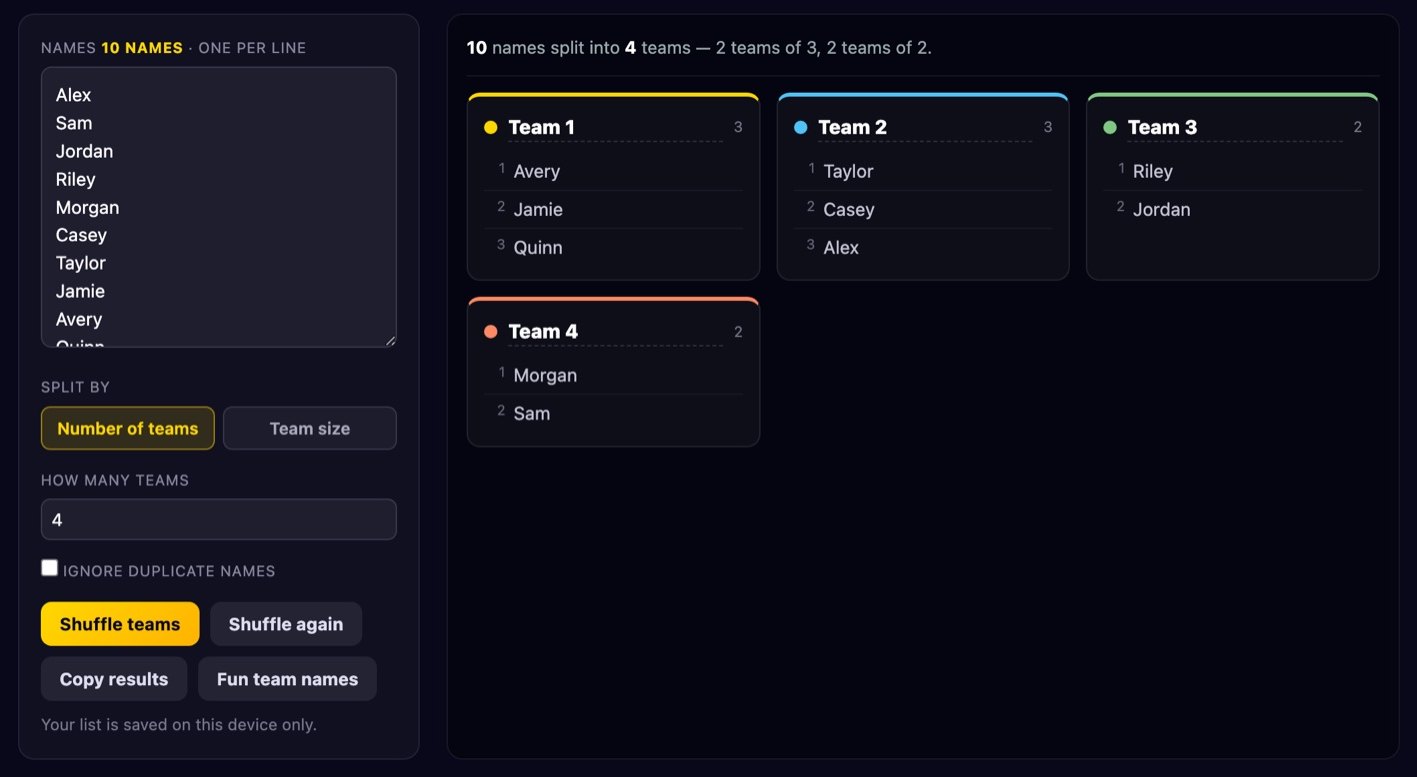
How to split a list into teams
- Paste your names. One name per line. Blank lines and stray spaces are stripped automatically, so you can paste straight out of a spreadsheet column, a chat message or a sign-up sheet.
- Pick your rule. Either number of teams (“split these 23 people into 4 groups”) or team size (“make groups of 5”). The counter above the box tells you how many names the tool actually found, which is the quickest way to catch a paste that went wrong.
- Shuffle. Every name is placed into a team at random, and the sizes are kept as even as the numbers allow.
- Adjust and share. Click any team name to rename it, hit Fun team names for instant silly names, or Copy results to grab a plain-text version you can paste into WhatsApp, Slack, Teams or a projector slide.
Your list is stored in your browser’s local storage so it survives a reload — handy if you run the same club night or the same class every week. Clearing your browser data clears it too.
Number of teams vs team size
These two modes answer different questions, and picking the wrong one is the most common reason a draw feels off.
Number of teams is right when the constraint is fixed on the outside: you have four pitches booked, three flipcharts, two consoles, or a tournament bracket that needs exactly eight entries. You know how many boxes there are; the tool works out how many people go in each.
Team size is right when the experience depends on the group being a certain size: escape-room slots of six, five-a-side, a board game that plays best with four, or seminar groups where more than five people means someone stops talking. You know how big each box should be; the tool works out how many boxes you need.
Numbers rarely divide evenly, so the remainder has to go somewhere. This tool spreads it rather than dumping it. With 15 names in 4 teams you get 3 teams of 4 and 1 team of 3 — never 4/4/4/3 by luck and 6/3/3/3 by accident. In team-size mode the same principle applies: 22 people in groups of 5 becomes four groups of 5 plus one of 2 only if you insist on strict sizes, so instead the leftovers are folded back in to give groups of 5, 5, 6 and 6 where possible. The rule is simple: no team ends up more than one person larger than any other unless the numbers make that impossible. The summary line above the cards always spells out the exact distribution, so you can show it to the room before anyone asks.
If you have fewer names than teams, the tool tells you rather than silently producing empty groups. Empty teams are almost never what someone wanted.
Why shuffling correctly matters
There is a one-line shuffle that appears in thousands of tutorials, code snippets and quick tools:
array.sort(() => Math.random() - 0.5)
It looks clever and it is genuinely wrong. Here is why, in plain language.
A sort function does not compare every item against every other item. It takes a shortcut: it asks the comparator about a small number of pairs and uses the answers to infer the rest. That inference is only valid if the comparator is consistent — if it says A comes before B today, it must say the same thing every time, and if A beats B and B beats C then A must beat C. The random comparator above breaks both promises. Ask it twice about the same pair and you can get opposite answers.
Because the sort algorithm trusts answers it will never re-check, the order it produces is shaped by which pairs it happened to ask about — and that depends on the algorithm and on where each item started. The practical result is a measurable bias: items tend to stay near where they began. If you run that one-liner on a list of ten names a hundred thousand times and count how often each name lands in each position, you do not get a flat distribution. You get visible lumps, usually with the first and last items far more likely to stay put. The bias also differs between browsers, because different engines use different sorting algorithms. It is not random; it is jumbled.
The correct method is the Fisher–Yates shuffle, and it is barely longer. Walk the list from the last item backwards. At each position, pick a random index between the start and the current position inclusive, and swap the two items. Then move one step left. That is it. Every one of the possible arrangements comes out with exactly equal probability, and the proof is easy to see: the first swap picks the final item uniformly from all n candidates, the second picks uniformly from the remaining n−1, and so on.
One more detail decides whether the implementation is actually uniform: how you produce that random index. The obvious Math.floor(Math.random() * n) is fine for a party game, but this tool uses crypto.getRandomValues to pull real random bytes from the operating system. Random bytes come in ranges like 0–4294967295, which does not divide evenly into, say, 7. Simply taking the remainder makes the first few values slightly more likely — the classic modulo bias. So the tool uses rejection sampling: it computes the largest multiple of the range that fits, and if a drawn number lands above that cut-off it throws it away and draws again. Discarded draws are rare, the loop finishes immediately in practice, and every index is exactly equally likely. Combined with Fisher–Yates, that means every possible team arrangement is equally likely — which is the only thing that lets you honestly call a draw fair.
Making teams feel fair
A draw can be mathematically perfect and still cause an argument. Fairness is half maths, half theatre. A few things that reliably help:
- Agree the method before you draw. Decide the number of teams, the size rule and what happens to leftovers while nobody knows the outcome yet. Once names are on the screen, every rule change looks like it was made to help someone.
- Shuffle in front of everyone. Project the screen, paste the list where people can see it, press the button once. A draw people watched happen is accepted far more readily than one that arrives as a finished list in a group chat.
- Re-shuffle only by a rule agreed in advance. “We re-draw if a team ends up with no goalkeeper” is a rule. “We re-draw because Sam complained” is not — and it destroys the credibility of every draw you run afterwards. If you might need a second attempt, say so before the first one.
- Seed known skill levels manually for competitive play. Pure randomness does not produce balanced teams, only unbiased ones. For anything with a scoreline, use snake seeding: rank people into tiers, then run this tool separately within each tier and deal one person from each tier into every team. You keep the randomness where it belongs while stopping all four strong players landing together.
- Handle constraints before you shuffle, not after. Siblings who must be separated, a driver needed per car, one first-aider per group — pull those people out, assign them deliberately, then shuffle everyone else into the remaining slots.
- Do not re-run “just to see”. Looking at three draws and picking your favourite is a choice, not a draw, and people can tell.
Where this is useful
- PE and classroom group work. Random assignment ends the misery of picking captains and choosing sides, and it breaks up the same four friends who always work together.
- Five-a-side and casual sport. Whoever turned up goes in the box, press shuffle, play. Pair it with manual seeding when the standard gap is wide.
- Board-game evenings. Split ten people into two tables of five, or draw partnerships for a trick-taking game without anyone feeling picked last.
- Hackathons and workshops. Mixed teams beat self-selected ones for cross-department contact. Run one shuffle per skill tier so each team gets a designer and a developer.
- Secret-santa-style pairings. Split the list into pairs with team-size mode set to 2, and you have your gift pairs in one click.
- Standup and presentation order. Use one team of everyone — the numbered member list is the running order, and nobody has to volunteer to go first.
- Chores, rotas and on-call. Deal names across a fixed set of jobs so the unpopular one moves around.
Is my list uploaded?
No. Every part of this tool — the parsing, the shuffle, the team cards, the copy button — runs as JavaScript inside your own browser. No names are sent to us or to anyone else, and there is no account and no server-side list. The only thing that is stored is a copy of your name list in your browser’s local storage on your own device, so the list is still there when you come back; clearing your browser data removes it, and using the tool in a private window means nothing is kept at all. Full details are in our Privacy Policy.
Frequently asked questions
How many names can I paste in?
Thousands. The shuffle is linear, so even a list of 10,000 names is sorted into teams in a few milliseconds. The practical limit is how many cards you want to scroll through, not the maths.
What happens to duplicate names?
By default they are kept, because two people genuinely called Chris both deserve a place. Tick Ignore duplicate names and the tool keeps only the first occurrence of each name — useful when you have pasted two overlapping sign-up lists together.
Can I get the same teams again later?
Not by re-running: the shuffle uses cryptographic randomness with no seed, so every press genuinely produces a fresh result. If you need to keep a draw, hit Copy results and paste it somewhere. That is also the honest way to run a draw — a reproducible one invites suspicion that it was chosen.
Can I make teams with a fixed captain?
Yes, with one extra step. Remove the captains from the list, shuffle everyone else into the right number of teams, then add one captain to each team by editing the names or writing them onto your copied text. The same trick works for any role that must appear once per team.
Why do my teams have different sizes?
Because your total does not divide evenly. The tool always keeps the difference to at most one person and states the split in the summary line, for example “3 teams of 4, 1 team of 3”. If you need exactly equal teams, adjust the total: add a substitute, or run one person as a floating referee or scorekeeper.
Does it work offline?
Once the page has loaded, yes — the whole tool is one self-contained page with no calls back to a server, so it keeps working on a flaky sports-hall connection.
More free tools: spin a spinner wheel to pick one winner instead of many teams, use the random number generator for draws and dice rolls, or browse all of our free browser tools.