Snake Reveal
A classic snake with a twist: instead of chasing a high score, it glides across a hidden grid and uncovers your photo one tile at a time until nothing is left covered.
▶ Play Snake Reveal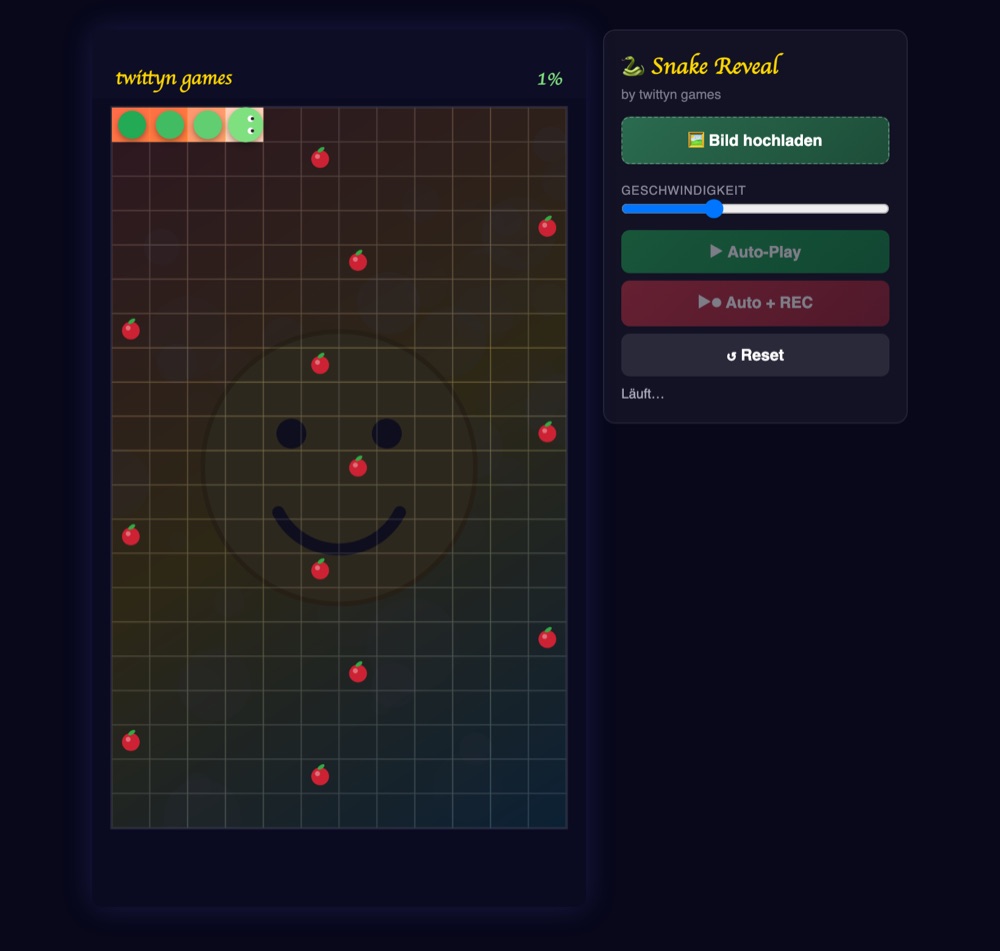
How the reveal actually works
Snake Reveal covers your photo with a 12×21 grid — 252 tiles in total — and drives a single snake head across every one of them along a fixed boustrophedon route: it clears a row left to right, steps down a row, clears that row right to left, and keeps alternating until all 252 cells have been visited. Because the route is precomputed rather than steered live, the head can never cut across its own tail or skip a tile; every run finishes with the whole board cleared, no exceptions. Each tile flips from opaque to revealed the instant the head reaches it, with a short 0.3-second white flash that fades out as it settles — enough to give each row a visible ripple as it clears rather than a flat wipe.
Speed is adjustable from 50 to 200 on the slider, which scales the head's pace directly: at the default of 100 it advances 5.5 tiles per second, clearing the full board in a little under a minute; push the slider to maximum and the same 252 tiles clear in roughly half that time, closer to 23 seconds.
Growth and pacing
Thirteen pieces of food sit at fixed points along the route, spaced roughly every 18 tiles. Reaching one adds two segments to the snake, so its body grows from four segments at the start of a run to around thirty by the final tile. That growing tail is the clearest signal of progress in a recorded clip — a short stub near the beginning stretches into a long ribbon winding across the board by the time the last tile clears. When the head reaches the final cell, the whole image flashes white for half a second before the run is marked complete.
Playing a round
- Upload an image with the “Bild hochladen” button, or skip it — the game generates a gradient-and-smiley demo image automatically so you can see the mechanic without uploading anything.
- Set the pace with the speed slider before you start; it can't be changed mid-run.
- Start the sweep. “Auto-Play” runs the board with no recording; “Auto + REC” starts the same run and captures it as a video from the moment you click. There's no manual steering in this game — the whole point is a clean, fully automated sweep every time.
- Reset clears the board back to idle so you can rerun the same image or swap in a new one.
Recording and sharing
Recording pulls straight from the canvas with captureStream(30) feeding a MediaRecorder, encoding a VP9 WebM clip at 8 Mbps with no extra render pass in between. Once the board finishes, capture keeps rolling for two more seconds after the finish flash so the clip has a clean tail, then stops on its own. From there you can download the WebM directly, or tap the share button, which hands the file to your device's native share sheet when supported — otherwise it saves the file locally so you can post it to TikTok, Instagram or wherever you like by hand.
Tips for a sharper clip
- Use a portrait-friendly photo. Uploads are scaled to cover the vertical frame rather than stretched or letterboxed, so a wide landscape shot loses its edges to the crop while a portrait keeps more of the frame intact.
- Pick a subject with a strong center. Since the sweep clears top row first and bottom row last, faces or logos placed centrally stay recognisable through most of the run instead of being revealed too early or too late.
- Match speed to platform. A higher setting gives a punchier ~23-second clip for short-form feeds; the default pace runs closer to a minute for a slower reveal.
- Let the food do the storytelling. The snake visibly lengthening as it eats is worth calling out in a caption — it reads as a distinct sense of momentum a static wipe doesn't have.
Good to know: Recording happens entirely in your browser via the Canvas captureStream API — nothing is uploaded to a server. Your image stays on your device unless you explicitly connect a social account and press share. See our Privacy Policy for the details.
Frequently asked questions
Can the snake really cover every tile without missing one?
Yes. The route is a fixed boustrophedon path computed once at the start — row right, step down, row left, repeat — so it visits all 252 cells exactly once and never crosses its own body.
Can I steer the snake myself?
No, Snake Reveal is fully automatic. There's no manual mode; every run uses the same guaranteed-coverage path, which is what keeps the final frame consistently complete.
How long does a run take?
It depends on the speed slider: roughly 23 seconds at maximum speed, up to about a minute and a half at minimum, with the default setting landing under a minute.
What image formats work?
Any standard browser-supported format — JPG, PNG, WebP. The image is cover-scaled to fill the vertical play area behind the grid.
Is it free?
Yes, Snake Reveal is free to play and record.