Marble Race
Drop a field of colored marbles onto a twisting downhill track and watch pure physics decide the winner — zigzag ramps, peg fields, funnels and spinning gates, all the way to a checkered finish line.
▶ Play Marble Race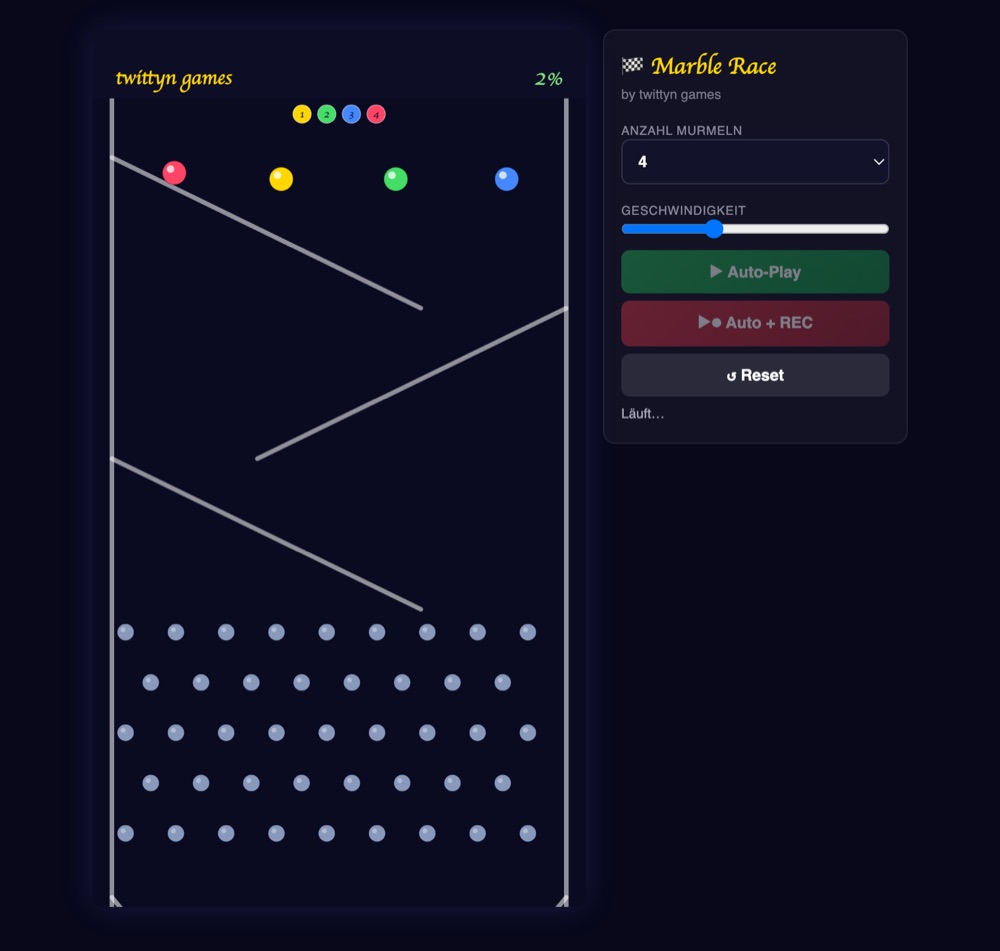
There's no bot to configure and no image to upload in Marble Race — you pick a marble count, hit play, and a physics simulation runs the rest. Every track is rebuilt from scratch each time you play, so the same settings never produce the same race twice. Here's what's actually happening under the hood, and how to turn a run into a clip worth posting.
The track is built segment by segment
Marble Race doesn't hand-place a course. It stacks four segment types in a repeating cycle — zigzag ramps, peg fields, funnels, rotating turnstile gates — until the track reaches roughly 6.4 times the height of the canvas. A zigzag segment is three angled ramp rows (about 26° each) that alternate direction, forcing marbles to switch sides on the way down. A peg field staggers five rows of round pegs across the lane so marbles scatter unpredictably instead of tracking a straight line. A funnel narrows the walls toward the middle, squeezing whatever's left of the pack into a bottleneck. A turnstile is a spinning cross-shaped gate with a randomized speed and direction, so it can either help a marble along or swat it sideways depending on the moment it arrives.
Because the order of ramps, pegs, funnels and gates is generated fresh at the start of every race, no two runs share a layout — even at the same marble count.
What decides the winner
Once the marbles drop, it's a real (if simplified) physics simulation, not scripted movement: gravity pulls every marble down, each frame is split into substeps so collisions with walls, pegs, gates and other marbles resolve cleanly instead of clipping through geometry, and every bounce loses some energy so the pack settles rather than ricocheting forever. Marbles also push each other on contact, so a tight cluster at a funnel can genuinely change who comes out ahead. If a marble ever stalls — wedged against a peg with almost no speed for about a second — it gets a small random nudge so the race doesn't stop dead. The camera itself tracks whichever marble is currently furthest down the track, smoothly re-centering as the lead changes, and any marble that falls too far behind gets quietly repositioned closer to the pack so it stays part of the visible action instead of disappearing off-screen for good.
How to play
- Choose your marble count. Pick 2, 3, 4 or 6 marbles from the dropdown — each one is assigned its own color automatically. Four is the default.
- Set the pace. A speed slider runs from 50% to 200%, letting you tighten or stretch out how fast the whole simulation plays.
- Start Auto-Play and Recording. There's no manual mode here — the race plays itself. Hit auto-play plus record and the descent is captured straight from the browser.
- Watch the lead change. The camera locks onto the front-runner as the pack fights through ramps, pegs, funnels and spinning gates.
- Catch the finish. The first marble past the checkered line triggers a trophy animation with a burst of confetti, and the race ends shortly after.
- Download or share. Grab the clip once it stops recording, or connect an account and post it directly from the page.
Getting a better clip out of it
- Ask viewers to call it before the drop. A caption like “Team Gold or Team Blue?” gives people a reason to watch the whole run and comment on the result.
- Use the speed slider deliberately. A slightly slower race gives close calls at the funnels and turnstiles more time to read on screen; a faster one compresses the whole thing into a punchier clip.
- Re-run the same marble count. Since the track regenerates every time, running the same settings twice can produce a completely different race — useful if the first attempt didn't have a close finish.
- Six marbles reads as chaos, two reads as a duel. Pick the count based on the story you want the clip to tell, not just for more action on screen.
Good to know: Recording happens entirely in your browser using the Canvas captureStream API. Nothing about your race is uploaded anywhere unless you explicitly connect a social account and press share. See our Privacy Policy for the details.
Frequently asked questions
Do I need to install anything?
No. Marble Race runs in any modern browser on desktop or mobile. There's nothing to download and no account required to play or record.
Can I name my marbles or set up custom teams?
Not inside the game itself — you choose a marble count and each one gets an assigned color. Naming or team framing is something you add yourself in the caption or an overlay when you post the clip.
Why does the track look different every time I play?
The ramps, peg fields, funnels and turnstile gates are generated fresh for each race, so even the same marble count and speed setting won't produce the same layout twice.
Can I post directly to TikTok?
Yes. Connect your TikTok account and you can share the recorded clip from the page, choosing the title, hashtags and privacy level before you post.
Is it free?
Yes, Marble Race is completely free to play and record.