Liquid Fill
Watch your photo rise out of the dark as a stream of liquid pours in from above — a wobbling tide climbs the screen in uneven surges until your picture is fully flooded into view.
▶ Play Liquid Fill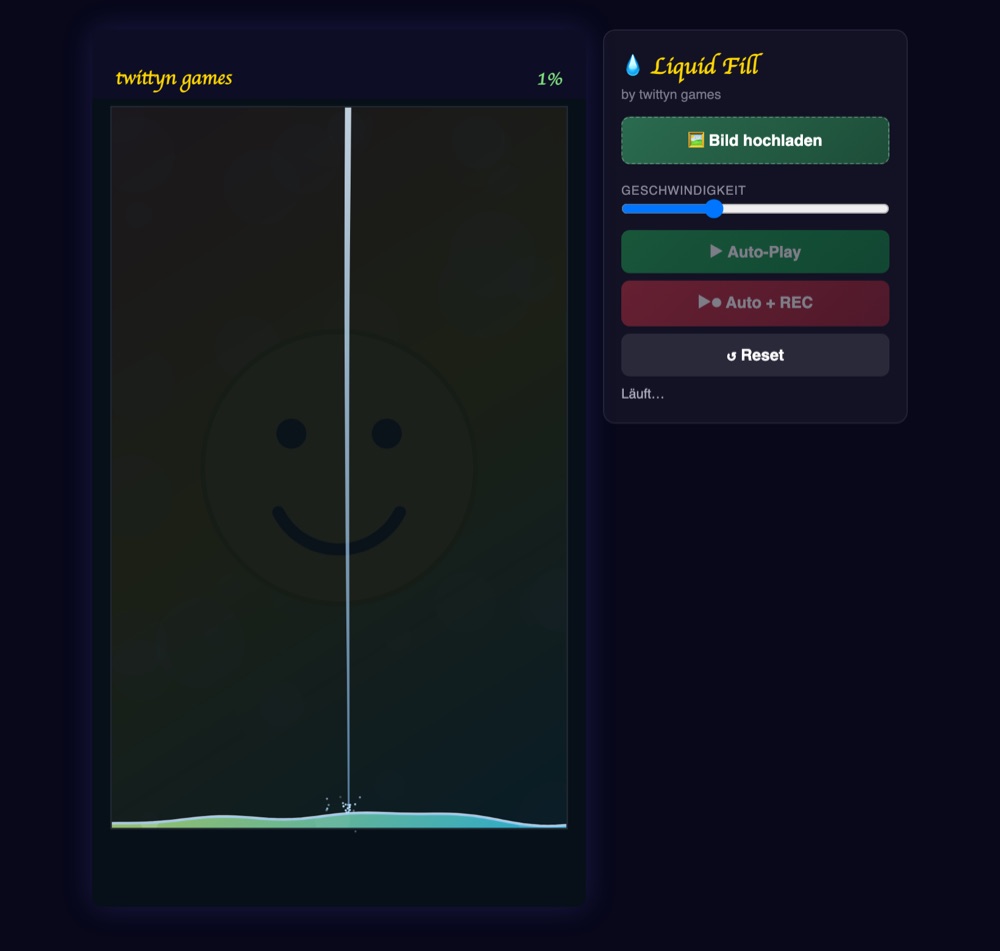
What is Liquid Fill?
Liquid Fill hides a photo under a layer of near-black water and lets it climb back into view a few percent at a time. A stream falls from the top of the frame, the pool underneath rises to meet it, and everywhere the surface has already passed, your picture sits fully lit and in focus. Above the surface, only a faint ghost of the image shows through the dark base at 8% opacity — enough to hint at what's coming, not enough to spoil it. The whole clip renders at 1080×1920, ready to post to TikTok, Reels or Shorts straight out of the browser.
How the surface is actually built
The waterline isn't a flat rectangle sliding upward. At every point across the frame, its height is the fill level plus three sine waves running at different speeds and wavelengths, layered on top of each other — a slow, wide roll; a medium ripple; and a faster, tighter shimmer. Added together they give the edge a natural, slightly chaotic wobble instead of a straight line. Wherever the inflow stream is currently landing, an extra dip is carved into the surface using an exponential falloff, so the impact point looks genuinely disturbed rather than just decorated on top.
Underneath that wavy line, the canvas clips to the exact wave shape and draws the source photo at full brightness with a light blue tint over it, plus a thin double stroke along the top edge for a glassy highlight. Nothing below the line is ever dimmed — the wave shape itself is the only thing separating hidden from revealed.
How to play
- Upload a photo. Tap “Bild hochladen” and choose an image; it fills the play area and becomes what the liquid reveals. Skip it and a generated demo graphic (a smiley on a gradient) is used instead.
- Set a speed. The Geschwindigkeit slider runs from 50 to 200 and scales how fast the fill level climbs and the stream drifts — it doesn't change how the bubbles or splashes move.
- Press Auto-Play or Auto + REC. Auto-Play just runs the flood; Auto + REC starts recording via the browser's captureStream API at the same time, no separate screen recorder needed.
- Let it run. The pour, the drift, the bubbles and the glitter all happen on their own — there's nothing to click mid-run.
- Reset, download or share. Reset clears the level back to zero for another take. Once the pool tops out, a download link appears, and a share button shows up for apps that support the Web Share API.
Surge, rest, repeat
The fill doesn't move at one constant speed. It alternates between a roughly 2.5-second “surge” phase, where the level climbs at about 1.3× the average rate, and a shorter “rest” phase, where it slows to roughly a fifth of that pace. That back-and-forth is what makes the flood feel like a pour instead of a progress bar — a stretch where almost nothing changes, then a fast jump in level.
The inflow stream itself drifts sideways on its own slow rhythm, made of two overlapping sine motions — one wide and slow, one smaller and quicker — so it never lands in exactly the same spot twice. Every so often it kicks a small handful of droplets out from the impact point, and once the level is high enough, bubbles start seeding from inside the liquid, wobbling as they rise until they reach the surface and pop into a few tiny droplets of their own.
Passing 25%, 50% and 75% each fires a burst of about two dozen glitter particles along the surface line — a small reward beat roughly every quarter of the run. When the level finally reaches the top, the waves don't just cut off; their amplitude eases down to flat over about a second and a half before the run ends and confetti fires across the screen.
Tips for a good reveal
- Put your subject in the lower half of the frame. That's the part the surface passes over earliest, so it stays clear and lit for most of the clip instead of only in the final seconds.
- Dark or high-contrast images hide better before the flood starts. The pre-fill ghost is only 8% opacity, so a bright, busy photo can still leak some detail through the dark base before the water ever reaches it.
- Don't rely on a perfectly even reveal. Because the fill alternates between surge and rest, a caption timed to a constant rise will drift out of sync — time it to the water level instead of the clock.
- Use the 25/50/75% glitter bursts as cut points. If you're trimming for a shorter platform, those are natural, already-lit beats to cut on.
Good to know: Recording uses the Canvas captureStream API directly in your browser. Your photo is never uploaded anywhere unless you connect a social account and choose to share. See our Privacy Policy for details.
Frequently asked questions
Does the speed slider change the wave pattern?
It scales how fast the fill level rises and how quickly the stream drifts side to side. The bubble physics, splash droplets and pop effects run in real time regardless of the setting.
What happens if I don't upload an image?
A generated demo graphic — a gradient background with a simple smiley — fills in automatically, so you can preview the flood before picking a real photo.
Do I need an account to record or share?
No account is needed to play or record. Sharing directly to an app uses your device's native share sheet if it supports files; otherwise you can download the WebM clip and post it manually.
Is Liquid Fill free?
Yes, playing and recording are both free.