Laser Reveal
A dense fog bank hides your photo, and a glowing laser core carves it away in real time — ricocheting off the walls and a set of rotating mirror bars until every last wisp of smoke is gone.
▶ Play Laser Reveal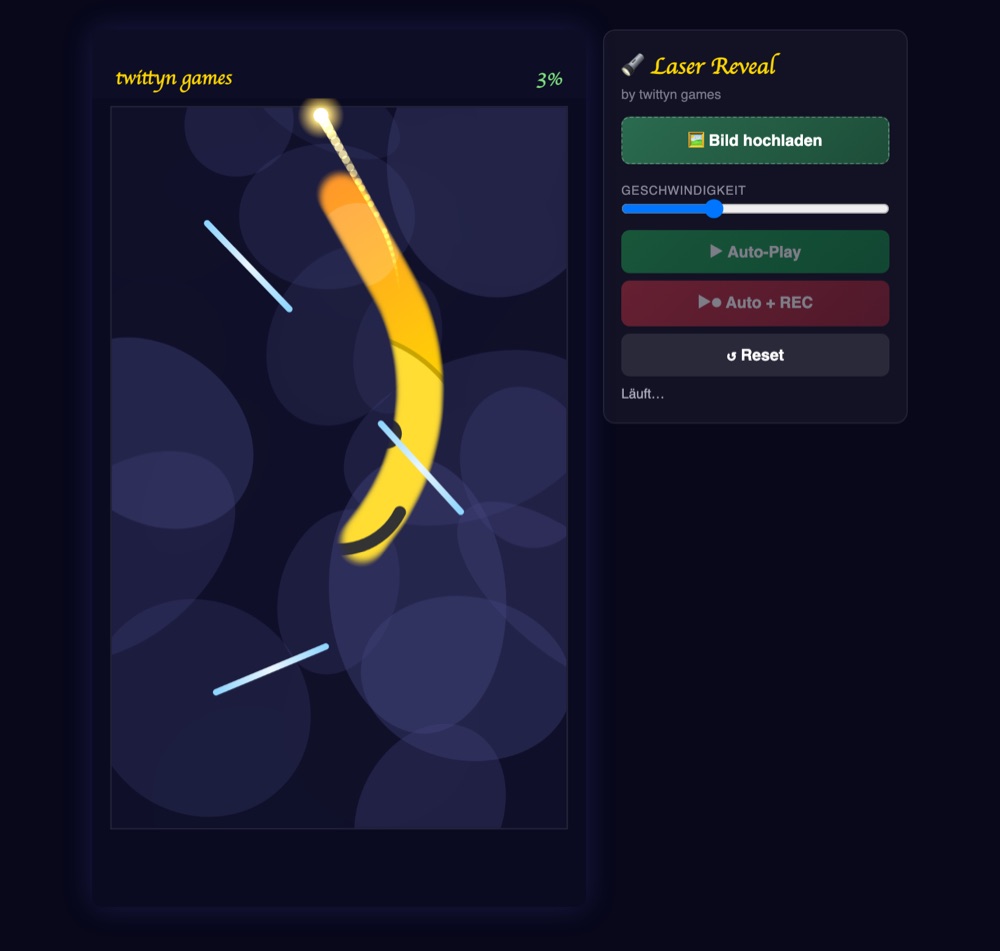
What is Laser Reveal?
Drop a photo into Laser Reveal and it gets buried under a hand-painted fog bank — a base fill dotted with dozens of soft, irregular smoke patches so no two boards look quite alike. A single core of light, dragging a fading tail behind it, then races around the frame at a constant speed. Wherever the core passes, the fog underneath it disappears in a soft circular pass, like a torch cutting through smoke rather than a hard eraser.
Three mirror bars sit fixed on the board but spin continuously, each at its own speed and direction. Every time the core clips one, it reflects off the bar's current angle instead of a static one, so the exact rebound depends on the moment of contact. Combined with the walls of the play area, that's enough moving geometry that the burn pattern is never identical between runs, even with the same photo and the same settings.
How the burn actually works
The fog isn't just faded out along the core's path — it's physically erased. The game paints the fog on its own canvas layer and burns holes into it with a radial gradient using destination-out compositing, so the center of the core's circle goes fully transparent and the edge blends softly back into smoke. That erase circle isn't fixed size: it starts modest and widens the longer the run goes, so the last stubborn pockets in the corners get mopped up by a wider brush late in the clip instead of needing extra passes.
The bot doesn't just let the core bounce randomly and hope for the best. Roughly every second and a half it re-checks a low-resolution grid overlaid on the fog layer, finds the region still holding the most unburned smoke, and steers the core's heading toward it. That steering isn't instant — the angle eases toward the new target gradually, so the wall and mirror bounces still read as physical reflections layered on top of a gentle course correction, not a snap-turn. To know how much fog is left at all, the game periodically downsamples the fog canvas to a fraction of its resolution and reads the transparency of each pixel; it only bothers checking every 30 frames since a full-resolution scan every frame would be wasteful for something that changes gradually.
How to play
- Upload your image. Pick a photo before you start — it becomes the picture hiding under the fog. Skip it and a generated demo image loads instead.
- Set a pace. A speed slider controls how fast the core moves and turns, which shortens or stretches the run without changing how the fog erases.
- Choose Auto or Auto + REC. Auto-Play hands the whole run to the bot. Auto + REC does the same thing while capturing it as a video straight out of the browser's canvas, no manual steering involved.
- Watch the burn spread. Every bounce off a wall or a rotating mirror bar redirects the trail, so the cleared area fills in from an unpredictable, organic pattern rather than a straight sweep.
- Grab the clip. Once the fog clears past its threshold, it fades out completely and the recording stops on its own a couple seconds later. Download the file or share it directly if you've connected an account.
Tips for a great reveal
- Pick a photo with a strong center subject. The core spends its early time carving through the busiest fog patches near the middle of the frame, so faces or bold shapes there read clearly well before the edges finish.
- Don't judge the run too early. The mirror bars keep rotating throughout, so the most interesting bounce angles and the widest burn radius both show up in the back half — a clip that looks patchy at 20% can look completely different by 70%.
- Slow the pace down for a moodier clip. Since the speed slider scales both movement and turning, a lower setting gives the beam more visible hang-time on each pass instead of racing straight through it.
- Let the corners finish themselves. They tend to hold fog longest since the core naturally favors the densest region first, but the widening burn radius is specifically there to close them out near the end.
Good to know: Recording happens entirely in your browser using the Canvas captureStream API. Your image never leaves your device unless you explicitly connect a social account and press share. See our Privacy Policy for the details.
Frequently asked questions
Do I need to install anything?
No. Laser Reveal runs in any modern browser on desktop or mobile, with nothing to download and no account required to play or record.
Why does the laser's path look different every time?
The three mirror bars spin at their own independent speeds, so the core is almost never hitting one at the same angle twice — and the bot's steering toward the densest remaining fog changes based on how that particular run has already burned through the layer.
What does the speed slider actually change?
It scales the core's travel speed and how quickly it turns toward the bot's chosen target, so a higher setting produces a faster, snappier clip rather than a different burn pattern.
Is it free?
Yes, Laser Reveal is completely free to play and record.